Grade Calculator – Free Online Tool to Calculate Your Grades
Calculating your academic performance does not have to be difficult. Whether you are preparing for an important exam, checking your homework scores, or tracking your overall course performance, a grade calculator can help you understand your results quickly.
The TotalGrader Grade Calculator helps students calculate their grades using earned points and total possible points. It can also help you understand percentages, estimate letter grades, and monitor your academic progress.
Instead of performing calculations manually, enter your scores into the calculator to get your result. This guide explains how the grade calculator works, which formula it uses, and how you can use your results to plan your studies.
What Is a Grade Calculator?
A grade calculator is an online educational tool that calculates a student’s academic performance using examination marks, assignment scores, quiz results, or other graded activities.
It converts numerical scores into percentages and, when a grading scale is selected, corresponding letter grades.
For example, if you earn 42 points out of 50 on a test, a grade calculator can determine your percentage by dividing your earned points by the total possible points and multiplying the result by 100.
Students can use a grade calculator to:
- Calculate test and examination percentages.
- Determine their current course grade.
- Calculate assignment and quiz scores.
- Understand their academic performance.
- Estimate their letter grade.
- Track progress throughout a semester.
- Identify areas that may need improvement.
The TotalGrader online grade calculator is designed to make these calculations easier for students without requiring complicated mathematical steps.
How to Use the TotalGrader Grade Calculator
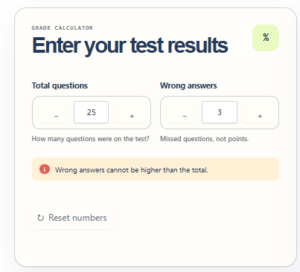
Using an online grade calculator is straightforward. You only need your earned marks and the maximum possible marks.
Follow these steps:
Step 1: Enter Your Earned Points
Enter the number of points you received on your test, assignment, examination, or other academic activity.
For example, if you scored 38 marks, enter 38 in the earned points field.
Step 2: Enter the Total Possible Points
Enter the maximum number of marks available for that assessment.
If your examination was worth 50 marks, enter 50 as the total possible points.
Step 3: Calculate Your Grade
Select the calculate option to process your information.
The calculator divides your earned points by the total possible points and multiplies the result by 100.
Step 4: Review Your Result
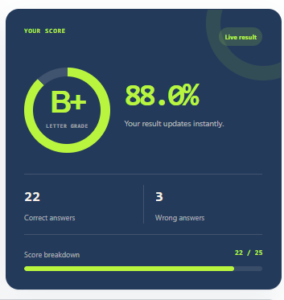
Your result displays your calculated percentage. If a letter-grade scale is available, you can also identify the corresponding grade.
Step 5: Use the Result for Academic Planning
Review your performance and identify whether you need additional preparation, practice, or revision before your next assessment.
Remember that your school’s official grading policy determines your final academic grade.
Grade Calculator Formula
The standard formula for calculating a percentage grade is:
Grade Percentage = (Points Earned ÷ Total Possible Points) × 100
This formula works for examinations, quizzes, assignments, and other assessments that use a points-based grading system.
Example of Grade Calculation
Suppose a student receives 76 points out of 100.
Using the formula:
Grade Percentage = (76 ÷ 100) × 100
Final Percentage = 76%
If the student’s institution uses a grading scale where 70% to 79% represents a C, the result would correspond to a C.
However, grading scales vary between schools, colleges, and universities.
Grade Calculator Examples
The following examples demonstrate how to calculate percentages using different examination scores.
| Points Earned | Total Points | Grade Percentage |
|---|---|---|
| 18 | 20 | 90% |
| 42 | 50 | 84% |
| 76 | 100 | 76% |
| 88 | 100 | 88% |
| 135 | 150 | 90% |
| 225 | 250 | 90% |
These examples show that a student’s grade depends on the proportion of points earned rather than the total number of marks alone.
For instance, earning 45 out of 50 and 90 out of 100 produces the same percentage grade of 90%.
Understanding Letter Grades
Many educational institutions use letter grades to represent academic performance.
A common US grading scale is shown below.
| Percentage | Letter Grade | General Description |
|---|---|---|
| 90–100% | A | Excellent |
| 80–89% | B | Good |
| 70–79% | C | Satisfactory |
| 60–69% | D | Below average |
| Below 60% | F | Failing |
This is an illustrative grading scale, not a universal standard. Some institutions use plus and minus grades, different percentage boundaries, or alternative grading systems.
Students should always check their institution’s official grading policy before interpreting a letter grade.
What Is a Weighted Grade Calculator?
A weighted grade calculator is used when different academic activities contribute different percentages toward the final course grade.
For example, a teacher may assign the following course weights:
- Homework: 20%
- Quizzes: 20%
- Midterm examination: 25%
- Final examination: 35%
In this system, the final examination contributes more toward the overall grade than homework.
The weighted grade formula is:
Weighted Grade = (Score × Weight) + (Score × Weight) + …
Each score and weight is expressed as a percentage, and the final weighted contributions are added together.
Weighted Grade Example
Suppose a student receives:
| Assessment | Score | Weight |
|---|---|---|
| Homework | 90% | 20% |
| Quizzes | 85% | 20% |
| Midterm | 80% | 25% |
| Final Exam | 88% | 35% |
The calculation is:
- Homework: 90 × 0.20 = 18
- Quizzes: 85 × 0.20 = 17
- Midterm: 80 × 0.25 = 20
- Final Exam: 88 × 0.35 = 30.8
Total weighted grade:
18 + 17 + 20 + 30.8 = 85.8%
The student’s overall weighted grade is 85.8%.
If your course uses weighted categories, use a weighted grade calculator rather than treating every assignment as equally important.
Difference Between Percentage Grade and GPA
Percentage grades and Grade Point Average (GPA) are two different ways of representing academic performance.
A percentage grade shows the proportion of marks earned out of the total possible marks.
GPA represents academic performance using a numerical grade-point scale, commonly 4.0 in the United States.
For example, a student may receive an 88% course grade and have a corresponding GPA value determined by their institution’s conversion policy.
GPA calculations may also consider course credit hours.
Because grading policies differ, students should use the appropriate GPA calculator for their academic institution.
Benefits of Using an Online Grade Calculator
Saves Time
Manual calculations can become inconvenient when students have several assignments, quizzes, and examinations.
An online grade calculator processes numerical scores quickly and reduces repetitive calculations.
Helps Track Academic Progress
Students can calculate their results throughout the semester to understand their current performance.
Regular grade tracking can help identify subjects where additional preparation may be useful.
Reduces Calculation Errors
Using a consistent mathematical formula helps reduce mistakes that can occur during manual calculations.
However, the accuracy of the result still depends on entering the correct scores and selecting the appropriate grading method.
Supports Examination Planning
Students can use their current grades to understand their academic standing and set realistic study goals.
For example, knowing your current percentage can help you calculate the score needed on a remaining examination.
Easy to Use
An online calculator does not require advanced mathematical knowledge.
Students simply enter their scores and review the calculated result.
How to Calculate Your Overall Class Grade
Your overall class grade depends on how your teacher combines assignments, examinations, projects, and other academic activities.
If all activities use a common points-based system, you can calculate your grade using:
Overall Grade = (Total Points Earned ÷ Total Possible Points) × 100
Example
Suppose your academic results are:
- Assignment 1: 18/20
- Assignment 2: 45/50
- Quiz: 16/20
- Examination: 82/100
Total earned points:
18 + 45 + 16 + 82 = 161
Total possible points:
20 + 50 + 20 + 100 = 190
Overall Grade:
(161 ÷ 190) × 100 = 84.74%
This method is appropriate when the course is calculated using total points. If your teacher assigns separate category weights, use the weighted grading formula instead.
Frequently Asked Questions
How do I calculate my grade percentage?
Divide your earned marks by the total possible marks and multiply the result by 100. For example, 45 out of 50 equals 90%.
Is the TotalGrader Grade Calculator free?
The calculator is intended to provide students with an accessible way to calculate academic grades online. Check the tool page for its current availability and features.
Can I calculate my test grade using this tool?
Yes. Enter your examination score and maximum possible marks to calculate your test percentage.
How do I calculate my grade if I have multiple assignments?
Add all earned points together, add all possible points together, and divide the earned total by the possible total. Multiply the result by 100.
If assignments have different weights, calculate their weighted contributions instead.
What is the difference between a grade calculator and a GPA calculator?
A grade calculator determines percentages or course grades, while a GPA calculator converts course performance into grade points and may account for credit hours.
Can I use a grade calculator for college courses?
Yes. The mathematical formulas can be used for many college courses, provided you select the correct points-based or weighted grading method.
Does a 90% always equal an A?
No. Although 90% is an A on many common grading scales, individual schools and universities may use different grade boundaries.
How accurate are online grade calculators?
A calculator can provide mathematically accurate results when the correct inputs and formula are used. However, official grades may differ because of institutional policies, rounding, extra credit, or other grading rules.
Conclusion
A grade calculator is a useful educational resource for students who want to understand their examination scores, assignment results, and overall academic performance.
By entering earned points and total possible points, you can calculate your percentage and use the result to monitor your progress.
The TotalGrader Grade Calculator makes the process easier by simplifying the mathematical work involved in grade calculations.
Whether you are preparing for an examination, checking a quiz result, or reviewing your semester performance, understanding your grades can help you make informed academic decisions.
Use TotalGrader to calculate your grade, understand your results, and keep track of your academic progress.