
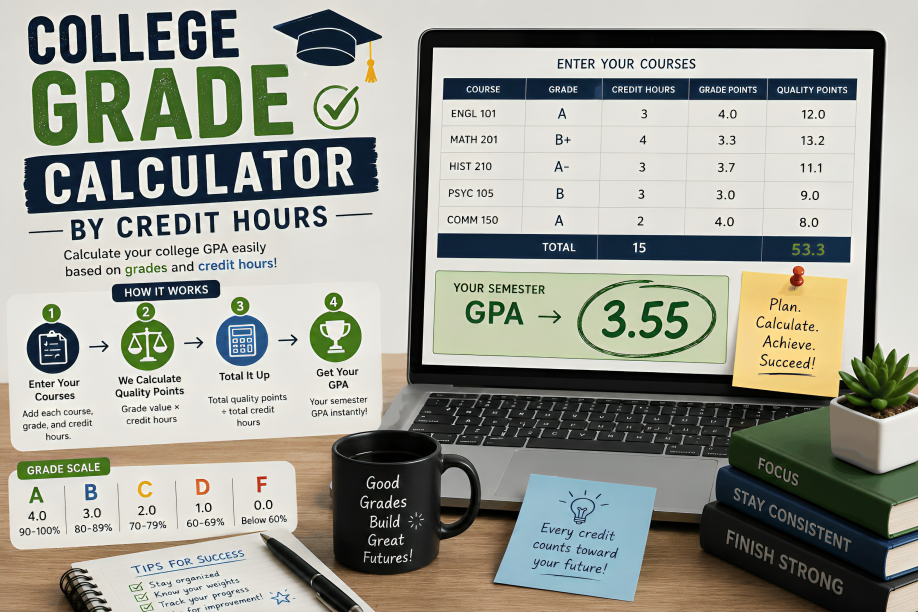
College Grade Calculator by Credit Hours
A College Grade Calculator by Credit Hours helps students calculate their GPA by considering both the grade earned in each course and the number of credit hours assigned to that course. This is important because college courses do not always carry the same academic weight. A 4-credit course can affect your GPA more than a 1-credit course.
Instead of simply adding your grades and dividing by the number of classes, a credit-hour calculator calculates quality points for each course and then divides the total quality points by the total credit hours included in the GPA calculation. This is the general method used by many colleges and universities, although individual institutions can have different grading scales and rules for courses such as pass/fail classes or repeated courses.
Use a College Grade Calculator by Credit Hours when you want to estimate your semester GPA, understand how individual courses affect your average, or check your calculations before comparing your result with your official transcript.
What Is a College Grade Calculator by Credit Hours?
A College Grade Calculator by Credit Hours is an online academic tool that calculates a student’s grade point average while giving each course a weight based on its credit hours.
For example, suppose you take two courses:
- Course A: 4 credits with a 4.0 grade point
- Course B: 2 credits with a 3.0 grade point
These courses should not normally be treated as equal when calculating a credit-weighted GPA. The 4-credit course contributes more quality points because it represents more credit hours.
The basic calculation is:
Quality Points = Grade Points × Credit Hours
Then:
GPA = Total Quality Points ÷ Total GPA Credit Hours
This credit-weighted approach is documented by university registrar offices, including the University of Arizona and the University of Notre Dame.
Why Do Credit Hours Matter in College GPA?
Credit hours determine how much each course contributes to a credit-weighted GPA.
Imagine you receive an A in a 1-credit course and a C in a 4-credit course. If you simply average the two grade points, both courses receive the same weight. A credit-hour calculation does not work that way.
The 4-credit course contributes four times as many credit-weighted grade points as a 1-credit course, assuming both courses are included in the GPA calculation.
This means your GPA can change significantly depending on the grades you receive in courses with larger credit values.
A simple way to remember the concept is:
More credit hours = greater GPA weight.
However, the exact courses included in a GPA can depend on your institution’s academic policies. Some universities exclude certain pass/fail or non-evaluative courses from GPA hours.
College Grade Calculator by Credit Hours Formula
The standard credit-weighted GPA formula is:
GPA = Σ(Grade Points × Credit Hours) ÷ Σ(Credit Hours)
You can break this formula into three steps:
- Convert each course grade into its corresponding grade-point value.
- Multiply the grade points by the course’s credit hours.
- Add the quality points and divide them by the total GPA credit hours.
For example, suppose a student has these grades:
| Course | Grade Points | Credit Hours | Quality Points |
|---|---|---|---|
| Biology | 4.0 | 4 | 16.0 |
| History | 3.0 | 3 | 9.0 |
| Mathematics | 3.7 | 3 | 11.1 |
| English | 2.0 | 2 | 4.0 |
Total Quality Points = 40.1
Total Credit Hours = 12
Therefore:
GPA = 40.1 ÷ 12 = 3.34
The result is approximately 3.34 GPA.
This is why calculating the average of the four grade points alone would not produce the same result.
How to Calculate College Grades by Credit Hours
Calculating your GPA manually is straightforward when you have your grade points and credit hours.
Step 1: List Your College Courses
Start by writing down every course that should be included in your GPA calculation.
Your transcript or course information should show the number of credit hours for each class.
For example:
- Biology — 4 credits
- Mathematics — 3 credits
- English — 3 credits
- History — 3 credits
Step 2: Find the Grade Point for Each Grade
Next, determine the numerical grade-point value assigned to each letter grade.
A common 4.0 scale might include values such as:
| Letter Grade | Example Grade Point |
|---|---|
| A | 4.00 |
| A- | 3.70 |
| B+ | 3.30 |
| B | 3.00 |
| B- | 2.70 |
| C+ | 2.30 |
| C | 2.00 |
| C- | 1.70 |
| D | 1.00 |
| F | 0.00 |
This table is only an example. Your college’s official grading scale should always take priority, because grade-point values and plus/minus policies can differ between institutions.
Step 3: Multiply Grade Points by Credit Hours
For every course, calculate:
Grade Points × Credit Hours = Quality Points
Suppose you earn an A in a 4-credit course:
4.0 × 4 = 16 quality points
If you earn a B in a 3-credit course:
3.0 × 3 = 9 quality points
Repeat this calculation for every course.
Step 4: Add the Quality Points
Add the quality points from all courses.
For example:
16 + 9 + 11.1 + 4 = 40.1
Your total quality points are 40.1.
Step 5: Add the GPA Credit Hours
Now add the credit hours:
4 + 3 + 3 + 2 = 12
You have 12 GPA credit hours.
Step 6: Divide the Totals
Finally:
40.1 ÷ 12 = 3.3417
Your estimated GPA is therefore:
3.34
University registrar guidance commonly describes this same basic process: multiply grade-point values by credit hours, total the resulting quality points, and divide by the applicable GPA hours.

College Grade Calculator by Credit Hours Example
Let’s work through a complete example.
Suppose a student completes five courses:
| Course | Grade | Grade Points | Credits | Quality Points |
|---|---|---|---|---|
| Chemistry | A | 4.00 | 4 | 16.00 |
| Economics | B+ | 3.30 | 3 | 9.90 |
| English | A- | 3.70 | 3 | 11.10 |
| History | B | 3.00 | 3 | 9.00 |
| Seminar | A | 4.00 | 1 | 4.00 |
Total quality points:
16 + 9.90 + 11.10 + 9 + 4 = 50.00
Total credit hours:
4 + 3 + 3 + 3 + 1 = 14
GPA:
50 ÷ 14 = 3.57
The student’s estimated semester GPA is therefore 3.57.
Notice that the 4-credit Chemistry course contributes 16 quality points, while the 1-credit Seminar contributes only 4 quality points. The credit-hour weighting prevents every course from being treated as identical.
Why a Simple Grade Average Is Not the Same as GPA
A common mistake is to average letter-grade points without considering credit hours.
Suppose you have:
- A = 4.0 in a 4-credit course
- C = 2.0 in a 1-credit course
A simple average would be:
(4.0 + 2.0) ÷ 2 = 3.00
But the credit-weighted calculation is:
(4.0 × 4) + (2.0 × 1) = 18 quality points
Total credits:
4 + 1 = 5
Therefore:
18 ÷ 5 = 3.60
The difference is substantial.
The 4-credit course carries four times the credit weight of the 1-credit course, so its grade has a much larger influence on the GPA.
How a College Grade Calculator Works
A digital College Grade Calculator by Credit Hours automates the calculations that you would otherwise perform manually.
Typically, you enter:
- Course name
- Letter grade or grade points
- Credit hours
- Number of courses
The calculator then:
- Converts the grade to its numerical value when necessary.
- Multiplies grade points by credit hours.
- Calculates quality points for each course.
- Adds the quality points.
- Adds the applicable credit hours.
- Divides quality points by GPA credit hours.
- Displays the calculated GPA.
Some calculators also provide course-by-course contributions so students can see exactly how the result was produced.
How to Use a College Grade Calculator by Credit Hours
Using the calculator is usually easier than calculating GPA manually.
Enter Each Course
Add every course that should be considered for the GPA.
For example:
Biology — A — 4 credits
Mathematics — B+ — 3 credits
English — A- — 3 credits
Enter the Correct Credit Hours
Credit hours are essential to the calculation.
Do not automatically enter the same number for every class. Labs, seminars, electives, and other courses may carry different credit values.
Always use the credit value listed by your college or university.
Select the Correct Grading Scale
If the calculator allows multiple grading scales, select the one that matches your institution.
A 4.0 scale is common, but colleges can differ in how they assign points to A+, A-, B+, and other grades.
Review the Result
After entering your information, check:
- GPA
- Total credit hours
- Total quality points
- Number of courses included
If the calculator result differs from your official transcript, your institution’s calculation rules should take precedence.
What Are Quality Points?
Quality points are the grade points earned for a course after accounting for its credit hours.
The calculation is:
Quality Points = Grade Points × Credit Hours
For example, if a student receives 3.7 grade points in a 3-credit course:
3.7 × 3 = 11.1 quality points
Quality points are important because they connect your grade to the academic weight of the course.
A course with a higher credit value generates more quality points for the same grade-point value.
University GPA guidance commonly uses this quality-point approach.
What Is the Difference Between GPA and Credit Hours?
GPA is the average of your grade points after applying the appropriate weighting rules.
Credit hours represent the academic credit assigned to individual courses.
Credit hours themselves are not your GPA. Instead, they determine the weight that each course receives when a credit-weighted GPA is calculated.
For example:
- Course A: 4.0 grade points × 4 credits = 16 quality points
- Course B: 3.0 grade points × 2 credits = 6 quality points
The two courses have different contributions because their credit values are different.

Semester GPA vs. Cumulative GPA
A semester GPA measures your performance during a specific academic term.
A cumulative GPA, sometimes called CGPA, considers your applicable coursework across multiple semesters.
For a single semester:
Semester GPA = Semester Quality Points ÷ Semester GPA Credits
For cumulative GPA:
Cumulative GPA = Total Quality Points Across Terms ÷ Total GPA Credits Across Terms
The University of Notre Dame describes cumulative GPA using total quality points from all applicable terms divided by total credit hours attempted across those terms.
Example of Cumulative GPA
Suppose you have:
Semester 1: 3.20 GPA over 15 credits
Semester 2: 3.60 GPA over 18 credits
You cannot simply calculate:
(3.20 + 3.60) ÷ 2 = 3.40
because the semesters have different credit-hour totals.
Instead:
3.20 × 15 = 48 quality points
3.60 × 18 = 64.8 quality points
Total quality points:
48 + 64.8 = 112.8
Total credits:
15 + 18 = 33
Cumulative GPA:
112.8 ÷ 33 = 3.42
So the credit-weighted cumulative GPA is approximately 3.42.
How Credit Hours Affect Your GPA
Credit hours can have a noticeable effect on your GPA.
A grade in a 5-credit course can have a greater effect than the same grade in a 1-credit course because the 5-credit course contributes five times the credit weight.
For example:
| Course | Grade Point | Credits | Quality Points |
|---|---|---|---|
| Course A | 4.0 | 5 | 20 |
| Course B | 2.0 | 1 | 2 |
Total quality points:
22
Total credits:
6
GPA:
22 ÷ 6 = 3.67
The higher-credit course has a larger mathematical influence.
This is one of the main reasons students should enter the actual credit hours for every course rather than simply counting the number of classes.
Does a 4-Credit Course Affect GPA More Than a 2-Credit Course?
Yes, when both courses are included in a credit-weighted GPA calculation, a 4-credit course carries twice the credit weight of a 2-credit course.
For example:
4-credit course: 3.0 × 4 = 12 quality points
2-credit course: 3.0 × 2 = 6 quality points
The grade point is the same, but the 4-credit course contributes twice as many quality points.
This does not mean the course automatically receives a different grade. It means the course has a larger weight in the GPA calculation.
Can You Calculate GPA Without Credit Hours?
You can calculate a simple average of grade points without credit hours, but that may not represent your official college GPA.
If all courses have exactly the same number of credit hours, a simple average and a credit-weighted average will produce the same result.
However, if your courses have different credit values, ignoring credit hours can produce an inaccurate estimate.
For an official GPA calculation, follow your institution’s published rules and transcript methodology.
What If My College Uses a Different Grading Scale?
Not every institution uses exactly the same grade-point system.
Some schools may use:
- 4.0 scales
- Plus/minus grading
- Different A+ policies
- Percentage-to-grade conversions
- Alternative grading systems
- Pass/fail or satisfactory/unsatisfactory systems
Therefore, a calculator should not automatically be assumed to reproduce your official GPA unless its grading scale and calculation rules match your institution.
For example, the University of Illinois notes that its official transcript calculation uses institution-specific GPA hours and grade-point rules.
When accuracy matters, compare the calculator’s grading scale with your college’s official academic catalog or registrar information.
Do Pass/Fail Courses Count Toward GPA?
Not necessarily.
A pass/fail or similar non-letter grade may be excluded from GPA calculations, depending on institutional policy.
For example, Case Western Reserve University’s registrar explains that a course with a P grade is not included in its GPA credit-hour calculation.
Other universities can have different rules.
Therefore, do not assume that every course appearing on your transcript belongs in the GPA denominator.
Do Repeated Courses Change the GPA?
Repeated courses can be handled differently by different colleges.
Some institutions may:
- Include both attempts.
- Replace the original grade.
- Apply grade replacement under specific conditions.
- Use the latest attempt.
- Apply special rules for repeated courses.
Because these policies can directly affect GPA, use your institution’s official repeat-course policy rather than assuming that a generic calculator knows how your college handles repeats.
Common Mistakes When Calculating College GPA
Even a simple GPA calculation can produce incorrect results if the input information is wrong.
Using the Number of Courses Instead of Credit Hours
The denominator should generally be the applicable GPA credit hours, not simply the number of classes.
Treating Every Course as Equal
A 1-credit class and a 4-credit class should not automatically receive identical weight in a credit-weighted GPA.
Using the Wrong Grade-Point Scale
A calculator using 3.3 for B+ will produce a different result from one using another institutional value.
Including Non-GPA Courses
Pass/fail, transfer, audit, or other special courses may be treated differently depending on institutional policy.
Entering Incorrect Credits
Always check your transcript, registration record, or official course information.
Rounding Too Early
If you manually calculate GPA, premature rounding can slightly change the final result. Keep sufficient decimal precision during intermediate calculations and round the final result according to your institution’s rules.
College Grade Calculator by Credit Hours vs. Manual Calculation
Both approaches use the same mathematical concept when configured with the same grading rules.
| Feature | Online Calculator | Manual Calculation |
|---|---|---|
| Speed | Very fast | Slower |
| Credit weighting | Automatic | Must be calculated manually |
| Quality points | Automatic | Manual |
| Multiple courses | Easy to enter | More work |
| Error risk | Depends on inputs and calculator rules | Higher with arithmetic mistakes |
| Understanding formula | May hide details | Shows every step |
| Best use | Quick estimates | Learning and verification |
An online calculator is convenient, while manual calculation is useful when you want to understand exactly how the GPA was produced.
How to Improve the Accuracy of Your GPA Calculation
For a reliable estimate, use the following checklist:
- Get your current grades from an accurate academic record.
- Confirm the credit hours for every course.
- Check your institution’s official grading scale.
- Identify courses that are excluded from GPA calculations.
- Check the rules for repeated courses.
- Enter grades and credits carefully.
- Avoid rounding intermediate calculations unnecessarily.
- Compare the final estimate with your official transcript when available.
A calculator can perform the mathematics correctly while still producing the wrong result if incorrect grades, credits, or grading rules are entered.
When Should You Use a College Grade Calculator?
A College Grade Calculator by Credit Hours can be useful throughout the semester.
Before Final Grades
You can estimate how different course outcomes could affect your semester GPA.
After Receiving Grades
You can calculate an estimated GPA before your official transcript becomes available.
Before Registration
You can review previous credit hours and GPA results to understand your academic standing.
During Academic Planning
Students can use credit-weighted calculations to understand how future courses may affect cumulative GPA.
Before Applications
If a scholarship, internship, graduate program, or other application asks for GPA, you can use your records to verify your current figure before submitting information.
Always use the official transcript when an institution specifically requires an official GPA.
Frequently Asked Questions
What is a College Grade Calculator by Credit Hours?
A College Grade Calculator by Credit Hours calculates GPA by weighting each course’s grade-point value according to its credit hours. The general formula is total quality points divided by applicable GPA credit hours.
How do I calculate GPA with credit hours?
Multiply each course’s grade-point value by its credit hours, add the resulting quality points, and divide by the total applicable credit hours.
GPA = Σ(Grade Points × Credit Hours) ÷ Σ Credit Hours
Why are credit hours important for GPA?
Credit hours determine the weight of each course. A course with more credit hours generally contributes more to a credit-weighted GPA than a course with fewer credit hours.
Does a 3-credit class affect GPA more than a 1-credit class?
Yes. When both are included in a credit-weighted GPA, the 3-credit class has three times the credit weight of the 1-credit class.
Can I calculate my GPA without credit hours?
You can calculate a simple average of grade points, but it may not match your college GPA when courses have different credit values.
What are quality points in college?
Quality points are calculated by multiplying a course’s grade-point value by its credit hours. For example, 3.5 grade points in a 3-credit course produce 10.5 quality points.
Is a 4.0 GPA always the highest possible GPA?
Not necessarily. A standard unweighted 4.0 scale has 4.0 as its maximum grade-point value, but some institutions use different scales or special weighted systems. Always check your school’s grading policy.
What is the difference between semester GPA and cumulative GPA?
Semester GPA measures performance during one academic term. Cumulative GPA combines applicable coursework across multiple terms using the institution’s GPA calculation rules.
Do pass/fail classes affect GPA?
It depends on your college’s policy. Some pass/fail courses are excluded from GPA calculations, while other grading systems may have different rules. Check your institution’s academic regulations.
Can a calculator give the exact official GPA?
It can reproduce the mathematical calculation when its grading scale and institutional rules match your college’s methodology. However, your official transcript remains the authoritative source for your reported GPA.
Final Thoughts on College Grade Calculator by Credit Hours
A College Grade Calculator by Credit Hours provides a practical way to calculate and understand your GPA. The key principle is simple: courses are weighted according to their applicable credit hours rather than being treated as identical units.
The core calculation is:
Quality Points = Grade Points × Credit Hours
and:
GPA = Total Quality Points ÷ Total GPA Credit Hours
The most important step is entering accurate information. Use the actual credit hours for every course, select the correct grade-point scale, and account for your institution’s rules concerning pass/fail courses, repeated courses, transfer credits, and other special grades.
A calculator is excellent for estimating and checking your GPA, but your college’s official registrar and transcript should remain the final authority whenever institutional rules determine how your GPA is reported.