
How Quick Grade Simplifies Classroom Grading
Experienced teachers know that grading dozens of tests and quizzes drains both focus and energy. A grading calculator like Quick Grade eliminates the chaos of manual math, delivering instant results that feel less like a shortcut and more like professional relief.
What surprises most educators is how this tool handles percentages, letter grades, and GPA simultaneously without confusion. Plug in the total number of questions, mark incorrect answers, and watch accurate, stress-free output replace the old ritual of pen, paper, and second-guessing every calculation.
Benefits of Using Quick Grade for Assignments and Tests
Quick Grade helps teachers save valuable time by instantly calculating scores, percentages, and grades for assignments and tests. Instead of spending hours on manual calculations, educators can focus more on lesson planning, student engagement, and academic support.
The platform also improves grading accuracy by reducing human error and providing consistent results across multiple assessments. This creates a smoother, stress-free grading process for teachers, tutors, and homeschooling parents alike.
Key Features of Quick Grade for Efficient Assessment
Quick Grade offers a user-friendly interface that allows educators to enter total questions, correct answers, and incorrect responses within seconds. Its simple design works seamlessly across computers, tablets, and mobile devices, making grading accessible anywhere.
Beyond basic calculations, Quick Grade supports custom grading scales, weighted assignments, and semester-based assessments. Additional features such as instant recalculation, score tracking, and target grade planning make it a powerful tool for efficient academic evaluation.
Why Teachers Choose Quick Grade for Daily Grading
Teachers choose Quick Grade because it simplifies one of the most repetitive aspects of education—grading. By automating calculations, it reduces workload and allows educators to process assignments, quizzes, and tests much faster than traditional methods.
The tool also promotes consistency and fairness by applying the same grading standards to every student. This reliability helps teachers maintain confidence in their assessments while dedicating more time to instruction and student development.
Quick Grade vs Traditional Grading Methods
Traditional grading methods often require teachers to manually calculate percentages, letter grades, and final scores, making the process time-consuming and prone to errors. Even small calculation mistakes can affect student records and create inconsistencies in assessment outcomes.
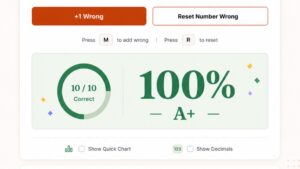
Quick Grade simplifies this process by instantly converting scores into percentages and letter grades. By automating calculations, it reduces workload, improves accuracy, and allows educators to focus more on teaching rather than administrative tasks.
Best Practices for Using Quick Grade in Classrooms
To maximize effectiveness, teachers should integrate Quick Grade with digital gradebooks and established assessment standards. Consistent use helps ensure that grading remains accurate, transparent, and aligned with learning objectives.
Educators should also use Quick Grade alongside professional judgment when evaluating projects, essays, and other subjective assessments. This balanced approach combines efficiency with meaningful evaluation of student performance.
How Quick Grading Improves Grading Accuracy and Speed
Quick Grade eliminates the risk of common mathematical errors that often occur during manual grading. By processing scores instantly, it ensures that students receive fair and consistent results across all assessments.
The platform also accelerates the grading process, enabling teachers to provide feedback more quickly. Faster grading supports student learning by allowing learners to identify strengths and areas for improvement without unnecessary delays.
Use Cases of Quick Grading for Schools and Tutors
Quick Grade is valuable for classroom teachers, private tutors, homeschooling educators, and academic support programs. It provides a reliable method for grading quizzes, assignments, tests, and practice assessments.
Schools benefit from consistent grading practices, while tutors can efficiently track student progress and verify assessment results. This flexibility makes Quick Grade suitable for a wide range of educational environments.
Quick Grading for Online Learning and Remote Education
In online and remote learning environments, timely feedback is essential for maintaining student engagement and academic progress. Quick Grade allows educators to calculate and return results almost immediately after assessments are completed.
The system works effectively for quizzes, online tests, and digital assignments, helping teachers manage multiple classes efficiently. By streamlining grading tasks, Quick Grade supports a more responsive and productive virtual learning experience.
Tips to Maximize Results with Quick Grading
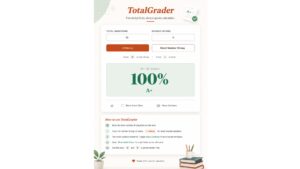
Educators who extract maximum value from QuickGrade treat retakes as structured opportunities rather than administrative burdens. Logging a new score after a test revision into a separate field ensures every student gets rewarded for genuine improvement without manually recalculating entire gradebook entries a discipline that teachers who manage high-volume assessment cycles quietly master over time.
The deeper efficiency emerges when original grading parameters stay locked while adjust scores functionality handles exceptions like extra credit or mid-semester policy shifts. Knowing precisely when to update a grade versus when to preserve the calculator‘s initial output separates reactive grading from intentional assessment design a distinction every serious educator eventually confronts when managing evolving student performance across dynamic gradebook systems.
Quick Grading vs Traditional Grading Methods
Traditional grading methods often require teachers to manually calculate percentages, letter grades, and final scores, making the process time-consuming and prone to errors. Even small calculation mistakes can affect student records and create inconsistencies in assessment outcomes.
Quick Grade simplifies this process by instantly converting scores into percentages and letter grades. By automating calculations, it reduces workload, improves accuracy, and allows educators to focus more on teaching rather than administrative tasks.
Best Practices for Using Quick Grades in Classrooms
To maximize effectiveness, teachers should integrate Quicks Grade with digital gradebooks and established assessment standards. Consistent use helps ensure that grading remains accurate, transparent, and aligned with learning objectives.
Educators should also use Quick Grade alongside professional judgment when evaluating projects, essays, and other subjective assessments. This balanced approach combines efficiency with meaningful evaluation of student performance.
How Quick Grades Improves Grading Accuracy and Speed
Quick Grades eliminates the risk of common mathematical errors that often occur during manual grading. By processing scores instantly, it ensures that students receive fair and consistent results across all assessments.
The platform also accelerates the grading process, enabling teachers to provide feedback more quickly. Faster grading supports student learning by allowing learners to identify strengths and areas for improvement without unnecessary delays.
Use Cases of Quick Grade for Schools and Tutors
Quick Grade is valuable for classroom teachers, private tutors, homeschooling educators, and academic support programs. It provides a reliable method for grading quizzes, assignments, tests, and practice assessments.
Schools benefit from consistent grading practices, while tutors can efficiently track student progress and verify assessment results. This flexibility makes Quick Grade suitable for a wide range of educational environments.
Quicks Grade for Online Learning and Remote Education
In online and remote learning environments, timely feedback is essential for maintaining student engagement and academic progress. Quick Grade allows educators to calculate and return results almost immediately after assessments are completed.
The system works effectively for quizzes, online tests, and digital assignments, helping teachers manage multiple classes efficiently. By streamlining grading tasks, Quick Grade supports a more responsive and productive virtual learning experience.
Frequently Asked Questions (FAQs)
What Is Quick Grades?
Quick Grade is an online grading tool that instantly converts scores into percentages and letter grades, helping teachers save time and improve grading accuracy.
How Does Quicks Grade Work?
Users simply enter the total number of questions and the number of incorrect answers, and the tool automatically calculates the final score and grade.
Is Quicks Grade Suitable for All Subjects?
Yes, Quick Grades can be used for a wide range of subjects, including math, science, language arts, social studies, and other assessment-based courses.
Can Quicks Grade Be Used for Online Learning?
Absolutely. Quick Grades is ideal for online and remote education, allowing teachers to grade quizzes, assignments, and tests quickly and efficiently.
Does Quick Grade Support Different Grading Scales?
Yes, many Quick Grade tools offer customizable grading scales, weighted grading options, and flexible settings to match school or district requirements.
Conclusion
Quick Grades is a practical and efficient solution for modern educators who want to simplify the grading process without sacrificing accuracy. By automating calculations and providing instant results, it reduces workload, minimizes errors, and allows teachers to focus more on student learning and classroom engagement.
Whether used in traditional classrooms, tutoring programs, homeschooling environments, or online learning platforms, Quick Grade delivers fast, reliable, and consistent grading support. Its ease of use, flexibility, and time-saving features make it an essential tool for teachers, tutors, and educational institutions seeking a more streamlined approach to assessment and performance tracking.
Disclaimer

The results and grades provided by TatolGrader.com are for informational and reference purposes only and should not be considered as official academic evaluations. We do not guarantee the accuracy, completeness, or reliability of any grading results generated on this platform. TatolGrader.com is not affiliated with any educational institution and holds no responsibility for decisions made based on the information provided. By using this site, you agree that the platform bears no liability for any errors, omissions, or outcomes resulting from your use of this service.