
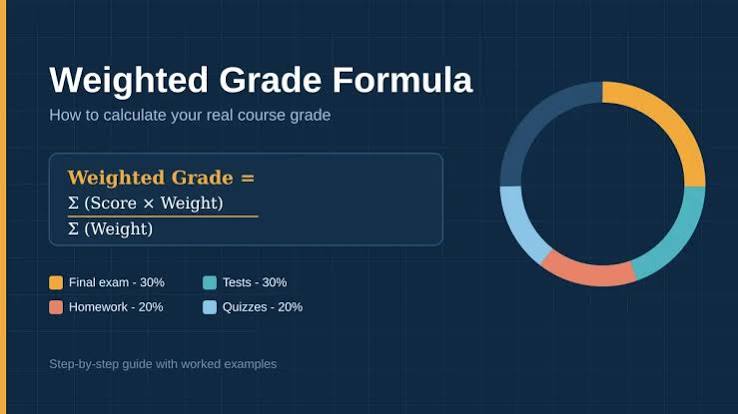
Weighted Grade Calculator by Category: Calculate Your Overall Course Grade
Weighted Grade Calculator by Category
A course grade is not always based on simply adding every assignment score together. Many schools and instructors use a weighted grading system, where different categories contribute different amounts to the final grade. For example, homework might count for 20%, quizzes for 15%, exams for 40%, and a final project for 25%.
A Weighted Grade Calculator by Category helps you determine how each category contributes to your overall course grade. It can also show you which areas of your course have the biggest effect on your final result.
Understanding weighted grades is especially important when you are trying to answer questions such as:
- What is my current overall grade?
- How much does my exam average affect my final grade?
- What score do I need on my final?
- Which category has the biggest impact on my grade?
- How much can improving one category raise my overall average?
The calculation is based on two things: your average within each category and the percentage weight assigned to that category.
What Is a Weighted Grade Calculator by Category?
A Weighted Grade Calculator by Category calculates your overall course grade by combining category averages according to their assigned weights.
For example, imagine a course has these categories:
| Category | Grade | Weight |
|---|---|---|
| Homework | 90% | 20% |
| Quizzes | 85% | 20% |
| Exams | 80% | 40% |
| Project | 95% | 20% |
Each category contributes a different amount to your final grade.
The formula is:
Weighted Grade = (Category Grade × Category Weight) + …
Using the example:
- Homework: 90 × 0.20 = 18
- Quizzes: 85 × 0.20 = 17
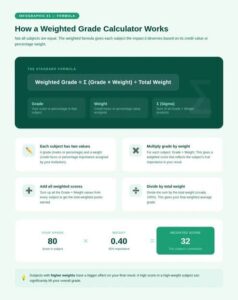
- Exams: 80 × 0.40 = 32
- Project: 95 × 0.20 = 19
Now add the contributions:
18 + 17 + 32 + 19 = 86%
Your overall weighted grade is 86%.
How Does Weighted Grading Work?
The main idea behind weighted grading is that not every part of a course has equal importance.
Suppose your teacher decides that exams should have a greater influence on your final grade than homework. Exams might represent 50% of the course, while homework represents only 10%.
This means improving your exam average could have a much greater effect on your final grade than improving your homework average by the same number of percentage points.
For example:
- Homework = 90%, worth 10%
- Exams = 80%, worth 50%
The homework contribution is:
90 × 0.10 = 9
The exam contribution is:
80 × 0.50 = 40
Although your homework grade is higher, exams contribute much more to the final result because they carry a larger weight.
Weighted Grade Formula
The standard formula is:
Overall Grade = (G₁ × W₁) + (G₂ × W₂) + (G₃ × W₃) + …
Where:
- G = category grade
- W = category weight expressed as a decimal
For example, 25% becomes 0.25, while 40% becomes 0.40.
Suppose your course has four categories:
- Assignments: 88%, worth 25%
- Quizzes: 92%, worth 15%
- Midterm: 78%, worth 25%
- Final Exam: 85%, worth 35%
Calculate each contribution:
88 × 0.25 = 22
92 × 0.15 = 13.8
78 × 0.25 = 19.5
85 × 0.35 = 29.75
Then add them:
22 + 13.8 + 19.5 + 29.75 = 85.05%
Your final weighted grade is 85.05%.

Why Use a Weighted Grade Calculator?
Calculating weighted grades manually is possible, but a calculator reduces the chance of making mistakes.
It can be useful throughout the semester because your category grades change as new assignments are completed.
A weighted calculator can help you:
Track Your Current Grade
You can enter your latest category averages to estimate where you currently stand.
Understand Grade Weights
You can see which categories matter most.
Set Academic Goals
You can determine what grades you need on future assessments.
Plan Your Study Time
If exams represent 50% of your grade, they may deserve more attention than a category worth only 10%.
Estimate Your Final Grade
Before the semester ends, you can use expected scores to estimate possible outcomes.
Example of a Weighted Grade Calculation
Consider a course with five categories:
| Category | Current Grade | Weight |
|---|---|---|
| Homework | 92% | 15% |
| Quizzes | 88% | 15% |
| Labs | 95% | 20% |
| Exams | 79% | 30% |
| Final Project | 90% | 20% |
First calculate each weighted contribution:
Homework:
92 × 0.15 = 13.8
Quizzes:
88 × 0.15 = 13.2
Labs:
95 × 0.20 = 19
Exams:
79 × 0.30 = 23.7
Final Project:
90 × 0.20 = 18
Now add them:
13.8 + 13.2 + 19 + 23.7 + 18 = 87.7%
Your weighted course grade is 87.7%.
How to Calculate Weighted Grades Step by Step
You can calculate your grade manually by following these steps.
Step 1: List Your Categories
Write down every grading category in your course.
For example:
- Homework
- Quizzes
- Exams
- Projects
- Participation
Step 2: Find Your Average in Each Category
Use your current scores to calculate an average for each category.
For example:
Homework = 90%
Quizzes = 84%
Exams = 78%
Step 3: Find Each Category’s Weight
Check your syllabus or online gradebook.
For example:
- Homework = 20%
- Quizzes = 30%
- Exams = 50%
Step 4: Convert Each Weight to a Decimal
Divide each percentage by 100.
- 20% = 0.20
- 30% = 0.30
- 50% = 0.50
Step 5: Multiply Grade by Weight
For example:
90 × 0.20 = 18
84 × 0.30 = 25.2
78 × 0.50 = 39
Step 6: Add the Contributions
18 + 25.2 + 39 = 82.2%
Your weighted grade is 82.2%.
Why Category Weights Must Add Up to 100%
In a standard weighted grading system, all category weights should normally total 100%.
For example:
- Homework = 20%
- Quizzes = 20%
- Exams = 40%
- Final Project = 20%
Total:
20 + 20 + 40 + 20 = 100%
If your listed weights add up to less than 100%, you may be missing a category.
If they add up to more than 100%, you may have entered one of the weights incorrectly.
However, some gradebooks use special systems, so always check how your instructor calculates the final grade.
What If You Have Different Weights?
Different weights are exactly what makes weighted grading different from a simple average.
Suppose you have:
- Assignment = 100%, worth 10%
- Quiz = 70%, worth 10%
- Exam = 80%, worth 80%
A simple average would be:
(100 + 70 + 80) ÷ 3 = 83.33%
But the weighted average is:
100 × 0.10 = 10
70 × 0.10 = 7
80 × 0.80 = 64
Then:
10 + 7 + 64 = 81%
Your actual weighted grade is 81%, not 83.33%.
The exam has the biggest influence because it represents 80% of the course.
Weighted Grade Calculator for a Final Exam
One of the most useful applications of a weighted calculator is determining the impact of a final exam.
Suppose your current grade is 84%, and your final exam is worth 30% of the course. The completed coursework represents the other 70%.
If you score 90% on the final:
84 × 0.70 = 58.8
90 × 0.30 = 27
Add them:
58.8 + 27 = 85.8%
Your final course grade would be 85.8%.
If you score 70% on the final instead:
84 × 0.70 = 58.8
70 × 0.30 = 21
58.8 + 21 = 79.8%
This shows why knowing the final exam’s weight is important.
How to Find the Grade You Need on a Final
You can also work backward to determine the score needed to reach a target grade.
Suppose:
- Current grade = 82%
- Final exam weight = 25%
- Completed coursework = 75%
- Desired final grade = 85%
The formula is:
Required Final Exam Grade = (Target Grade − Current Grade × Completed Weight) ÷ Final Weight
Convert the weights:
- Completed = 0.75
- Final = 0.25
Now calculate:
82 × 0.75 = 61.5
Subtract from your target:
85 − 61.5 = 23.5
Then:
23.5 ÷ 0.25 = 94%
You would need 94% on the final exam to finish with an 85% overall grade.
What If Your Gradebook Uses Points Instead of Categories?
Not every course uses weighted categories.
Some instructors simply total all points earned and divide them by all points possible.
For example:
450 points earned ÷ 500 points possible × 100 = 90%
This is a points-based grading system, not necessarily a weighted-category system.
You should not use a weighted formula unless your course actually assigns category weights.
Weighted Grade vs. Simple Average
A simple average treats every category equally.
Suppose your category grades are:
- 70%
- 80%
- 90%
Simple average:
(70 + 80 + 90) ÷ 3 = 80%
But suppose the weights are:
- 20%
- 30%
- 50%
The weighted calculation becomes:
70 × 0.20 = 14
80 × 0.30 = 24
90 × 0.50 = 45
Total:
14 + 24 + 45 = 83%
The weighted grade is 83%, even though the simple average is 80%.
Common Mistakes When Calculating Weighted Grades
Forgetting to Convert Percentages to Decimals
Use 30% as 0.30, not 30.
Using a Simple Average
If categories have different weights, simply adding their grades and dividing by the number of categories will give the wrong result.
Entering the Wrong Category Weight
A small error in a major category can significantly change the result.
Forgetting a Category
Make sure every category included in your syllabus is represented.
Confusing Assignment Weight With Category Weight
An individual assignment may contribute to a category rather than directly to the final course grade.
Ignoring Your School’s Grading Policy
Some instructors use unusual calculations, dropped scores, extra credit, or other rules.
Frequently Asked Questions
What is a weighted grade?
A weighted grade is an overall grade calculated by giving different categories different levels of importance.
How do I calculate my weighted grade?
Multiply each category grade by its decimal weight, then add all the results.
Overall Grade = Σ(Category Grade × Category Weight)
What is 20% as a decimal?
20% is 0.20.
What if my category weights do not equal 100%?
Check your syllabus or gradebook. You may have missed a category or entered a weight incorrectly.
Does a higher-weight category matter more?
Yes. A category worth 40% has twice the influence of one worth 20%, assuming the same change in percentage points.
Can I use a weighted calculator for my final exam?
Yes. You can use it to estimate your final course grade or determine the score required to reach a target.
Is a weighted average the same as a normal average?
No. A normal average generally gives each value equal importance, while a weighted average gives different values different levels of importance.
How can I improve my weighted course grade?
Focus on categories with both a low current grade and a high percentage weight. Improving a major category can have a larger effect than making the same improvement in a low-weight category.
Final Thoughts
A Weighted Grade Calculator by Category is an effective way to understand how different parts of your course contribute to your overall grade.
The central formula is:
Overall Grade = (Category Grade × Weight) + (Category Grade × Weight) + …
For example, if your homework grade is 90% and homework is worth 20%:
90 × 0.20 = 18
Those 18 points represent the homework category’s contribution to your final course grade.
The same process can be repeated for quizzes, exams, projects, participation, and other categories. Once all contributions are calculated, add them together to find your weighted course grade.
Weighted grading is particularly useful because it shows that not every assignment or category has the same influence. A small improvement in a category worth 50% can matter much more than the same improvement in a category worth 10%.
Before using any calculator, check your syllabus or gradebook carefully. Make sure you know whether your course uses weighted categories, total points, dropped scores, extra credit, or another grading method. Using the wrong system can produce a result that looks reasonable but does not match your instructor’s actual calculation.
Once you understand the weights, the process becomes much easier. You can track your current performance, estimate your final grade, identify important categories, and determine what scores you need on upcoming assessments to reach your academic goals.